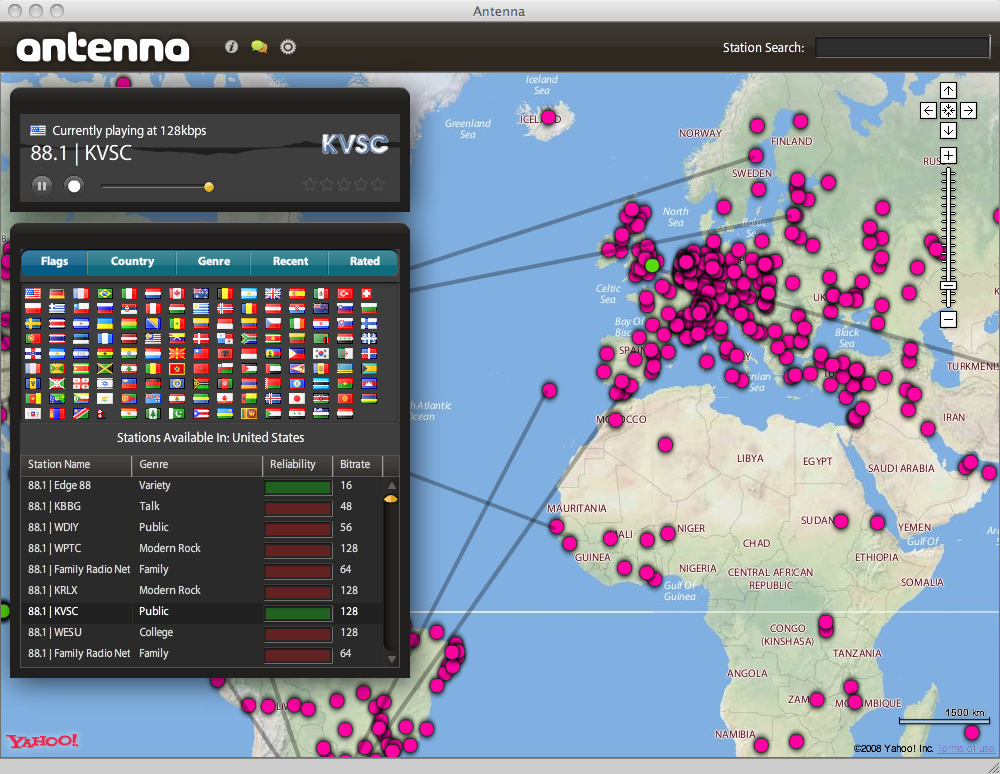
Shouldn’t finding radio stations online be easier? Based on the Adobe AIR runtime, Antenna tries to alleviate that. Using a vast list of stations combined with a map interface, you can discover, listen to, and switch between thousands of stations effortlessly. Search is possible by country or genre, or just by clicking on a location on the map. Beyond that you have a history of recently-listened stations and can even rate the ones you like and return to them easily later.

Please upgrade your Flash Player
This is the content that would be shown if the user does not have Flash Player 6.0.65 or higher installed.

If you’re having trouble installing with the image above, try manually installing Adobe AIR and then downloading the Antenna installer file. If you still have issues installing, let me know in the comments.

Changes in Version 1.4.4 (April 18, 2010):
- Ability to add your own stations.
- Improved recording functionality on Windows.
- 4906 more stations, more than twice as many as before!
- Improved search.

115 Responses to “Antenna”

  1. Carl Says:

    Have reinstalled (and uninstalled) Air 3 times but still get message “The application could not be installed because the AIR file is damaged. Try obtaining a new AIR file from the application author.” when I attempt to download and install Antenna. Running up to date Vista Home Premium

  2. bcdef Says:

    Does this happen even if you try the manual link here? http://bcdef.org/downloads/Antenna_v1.4.air

  3. LOL Says:

    It’s just so COOL! YEAH!

  4. Arpad Bajzath Says:

    Thanks for this! Realy great application! :)

  5. Oliver Says:

    I could install adobe air, but cannot install antenna… even if i try it manually… installation doesn’t start when i click on the install file… my os is vista

  6. Bage Says:

    Now I am hearing all my favorites radios in my Mac. Thanks.

    Is there any possibilities to add my own channels?

    Thanking you
    Bage.

  7. dwight Says:

    Tried both methods of downloading, then tried opening.(not saving) AIR reports “broken link.” download does not complete.

  8. Ford Prefect Says:

    I have the same problem. Even using manual istalling…

  9. Dwight Says:

    Wow, what a great program. I can listen to California stations as well as some in South Afica, Russia, or Spain, or?
    Fanastic!

  10. P.A. van Buuren Says:

    Hartelijke Dank voor dit Downloaden voor het programma

  11. The Viking Says:

    Thanks for this application. It seems to do what it advertises. My only niggle (if that’s possible) is that once you’ve selected a station, the zoom level goes back to the default zoom level, instead of staying locked where you had it to select the station.
    Other than that, I rather like the application. I wish I could add arbitrary stations too.
    Cheers!

  12. Eric Chin Says:

    Fantastic program. Works great on my laptop. Great if there is some kind of tutorial on using the program, like how do we rate the stations we had listen to ?

  13. Eddie Berman Says:

    Great app! Two suggestions:
    1) When the top list is sorted by Genre, the bottom list’s 2nd column should be something other than Genre (since it’ll be the same for every row). In that case, how about changing that column to Country?

    2) Add Radio 4 Netherlands

  14. war59312 Says:

    Hi,

    Nice, but would be sweet if you could use google maps.

    Also, would be really nice if you could have the applicatiion use your default audio application (if you wish it to of course).

    Lastly, this might be out of scope of this application, but it would be very cool if Internet based radio stations could be added to this application.

    These would be awesome to have in this application:

    http://www.shoutcast.com/
    http://www.novastreamradio.org/
    http://www.sky.fm/
    http://www.1.fm/
    http://www.181.fm/

    Thanks a lot,

    Will

  15. war59312 Says:

    Hi,

    Whooops, forgot:

    http://www.977music.com/

    Thanks again,

    Will

  16. Jari Hakkarainen Says:

    Wow, what a great app! This is the kind of application I’ve always dreamt of. Is there a way to suggest new stations?

  17. hakon e g Says:

    hi
    i just love the antenna it works great….and i can feel at home listening to my homeland (norway) radios in my home in Bali or anywhere….

  18. Hans Says:

    During installation I got an Error# 3001
    Any idea what this means?

  19. Sreedhar Says:

    thanks for the application

  20. Marc Weidenbaum Says:

    Just tremendous. Thanks for having made this available.

  21. seven Says:

    Thank you!

  22. Joriksun Says:

    Awesome soft!
    I just have to notice, that if i try to record stream, it’s doesn’t save mp3-file. The problem is in Russian Windows OS. We have “My Documents” folder in cyrillic. Please, be adviced to add “change basic stream folder” option into setting or just integrate cyrillic.
    Thanks a lot!

  23. devanir Says:

    muito bom mesmo gostei……………..

  24. Luiz Says:

    Quero ouvir.

  25. Lino Says:

    gostaria de adquirir esse aplicativo.
    antenciosamente.

    Lino.

  26. Romulo Junior Says:

    eu nem tenho o apricativo ainda nao posso fala nada sobre ele

  27. Jander Says:

    Realmente é muito bom ouvir outras rádios de outros paises só assim agente fica sabendo dos sucesos em termos de músicas nos locais mais distantes desse mundo.

  28. Thomas Says:

    It seems that when I try to record audio using the record-button, Antenna tries to store the file on a file location starting with a back-slash (like /C:/Users/Username/Documents/Antenna Radio Streams/Radio Norge 103.9 /Stream_20100304_1267684700304.mp3

    Is there some way I can reconfigure Antenna to avoid this problem?

    Besides that, great program!

  29. Franchico Says:

    My congratulations. This aplicative is beautyful!!!

  30. Victor Says:

    Outstanding!
    Undoubtedly I’ve never been through such amazing joy throughout my whole life. It’s much more that I could’ve ever asked for or imagined. I can’t just stand all the feelings I’ve got inside of me right now. It’s thrilling, raging, it’s antenna!

  31. Aniket Says:

    Why no stations from India?..how do i add them??

  32. FP Says:

    Thanks very much for this great app!

  33. M Says:

    Any way to add in stations not found by the map?

  34. Rafa Says:

    Thank you, great app. I lived in Spain and I’m bored of the national stations, your app facilities very much listen any online station.

    Congratulations!

  35. Karthik Jayaram Says:

    Do you have iPhone app?

  36. crizzz Says:

    how can i deinstall antenna?

  37. Ken Says:

    Just started using and its great. One problem I have found is that all Canadian CBC Radio 2 stations fail to play with ‘connection error’ noted as reason. Any way to overcome this?
    Thanks

  38. John Says:

    Brilliant program. Visually stunning, intuitive interface, and very fun and useful. Well done.

  39. Deadly Says:

    Why shackle yourself to the Adobe fiefdom with the Air platform? I think a portable app that could be run off a USB stick would be a much better choice and allow a much wider customer base to enjoy your program. I don’t get why developers insist on alienating their customers like this.

  40. Alan Says:

    Wow this is great, Thank YOU!!

  41. Michael Says:

    Great application. Truly beautiful. Any way to add or suggest stations yet?

    This site has almost all Radio stations available in Greece http://www.e-radio.gr/default.asp?langID=2 just in case you take suggestions.

  42. proxemics Says:

    this is amazing! just installed and cant get enough! only thing would be the zoom reset after you click a station. great idea/work! maybe add something to allow users to add stations to keep the list growing? still, this is amazing!!

  43. proxemics Says:

    oh, maybe a link to the radios site or some way to get more info on them? im hearing all this awesome music and i need to know who it is!! haha. :) this has made me really excited, thanks!!

  44. Ric Steinberger Says:

    Great resource…. Please tell me you’re working on an iPhone App for Antenna

  45. Mike Says:

    Will not install get error message:
    “Sorry, an error has occurred.

    The application could not be installed because the AIR file is damaged. Try obtaining a new AIR file from the application author.”

    Have uninstalled AIR rebooted PC and reinstalled AIR 3 or 4 times without success.

    AIR installs with no problem but ANTENNA install fails.

    Using Toshiba Satellite L35 series laptop with Windows XP Media Center Edition Version 2002, SP3. Intel Celeron 410@1.46GHZ and 2 GB ram

  46. Cristiano Says:

    I never used Adobe Air before, e liked this tecnology, very good app

  47. Andy Says:

    This application is totally awesome. Thanks for introducing us to it! I’m now listening from SEAsia to an 80s station based in NE Brazil.

  48. Zoli Says:

    Nice app!
    I can’t find my favourite radio station, is there any way to suggest new stations?

  49. Steve Says:

    When we can start adding the stations we want to hear, I might reinstall and give it another try.

  50. vidyadhar Says:

    Awsome.. I always like AIR applications :)

  51. Jacky Says:

    Hoi.

    Radio install on windows 7 – no problem.
    But playing radio is skipping a lot.

    Greetings Jacky

  52. Filzer Says:

    I couldnt get it installed.

    It said: “The application could not be installed. Try installing it again. If the problem persists, contact the application author.” Error #0

    I ve tried both modes of installation suggested.

  53. Jason Says:

    Really nice, installed flawlessly in ubuntu 9.04, via firefox, which was a pleasant surprise…

  54. charleyvarkey Says:

    plz add a tab for adding a new station

  55. Manfred Says:

    ANTENNA does no recording! The folder announced will be created but no content in it! Any solution for that?
    Greetings….!

  56. adj Says:

    I downloaded Adobe Air 1.5.3.9130 today, and received the error message ‘unable to load the Adobe Air Browser API swf’ when I tried to install Antenna, Any views ? Best wishes, Andrew

    (I am running windows 7 ultimate on a pc cobbled together out of AMD Phenom II x4 , 2600 MHz, 32-bit, Asus M4N78-AM mainboard, Nvidia Geforce 8200, 4MB of DDR2 SDRam)

  57. Audrey Says:

    Very, very cool app! Thank you! I had no trouble installing this and so far the app has been going smoothly.

    The one thing I’ve been having trouble with is that every time I go to open the program, I need to “install” it again. Is there any way I can just get it to open from my Applications folder? (I’m on a Mac)

  58. Mike Says:

    Seemed like a lot of dead channels and a very small amount in the United States. I can think of atleast 5 streaming websites in my area and only one is listed.

    That said, I really like the interface. A lot nicer than most streaming websites with just a list to choose from.

  59. Glenn Lopez Says:

    hi, i already installed adobe air’s latest version and it keeps giving me this error http://cl.ly/34D is there anything i need to do prior installation?

  60. juschilin Says:

    Simply awesome!
    only thing missing is a few of my favorite reggae stations radio stations.

    http://www.tellstream.com
    http://www.go-jamaica.com/power/
    http://www.newstalk.com.jm

  61. Jablajabla Says:

    Much ado about nothing. For example, three radio stations in Los Angeles, California and none of them the famous KROQ…good night earth!

  62. Christina Says:

    I am Christina marketing executive at Softonic.com. I am contacting you to inform you that Antenna 1.4.1 has been picked as the editor’s choice for April 8, 2010. Our editors select one product a day as the best product for our users. Antenna 1.4.1 will be featured on our homepage all day (http://en.softonic.com/).

    Here is the link to the program page: http://antenna.en.softonic.com/

    If you would like to the link to the Editor’s Choice badge on your site feel free to contact me.

  63. Soloman Says:

    this is like wakeing up in the mountians for the first time.

  64. TomatoMan Says:

    You are sorting the bit rates wrong in your app, you are sorting them in dictionary mode, instead of numerical mode. Change them from strings to integers and you should be fine.

    Dictionary Mode:
    1 10 11 2 234 25

    Number mode:
    1 2 10 11 25 234

  65. Bob Says:

    Very nice, loaded quickly…but where’s the BBC? he search function leads to stations that ofer World Service but I was looking for BBC Radio 2 and Radio 3…that said, I like what is here and its ease of use and accessibility

  66. IdleOne Says:

    Awesome! running Ubuntu 10.04 Lucid Lynx beta 2.

    clicked install and within a minute I was listening to my favorite station in PA-USA :D

  67. 王义星 Says:

    I am chinese,thank you very much for zhe cool software.

  68. kimchiua (炯烈男子) Says:

    I had introduced your website to Chinese friends in Mini Blog( Chinese’s face book)to my blog’s friend. They are crazy this amazing and joy it now….I love it.!!

  69. kimchiua (炯烈男子) Says:

    How can a radio station connect with your website to work on it ? If we would like to make a internet radio station by internet connected and by myself ?

  70. Sameer Says:

    Thank you Antenna 4 being simply the best
    How you do it, I’ll never know.
    Your excellence spoils us for all of the rest
    The world’s a better place
    Because of outstanding application like you.

    Heartfelt Thanks…

  71. Luke Says:

    This is an absolutely excellent application – Allowing us to see the virtual stations being broadcast from actual locations is a stroke of genius.

    I would suggest a few tweaks to the interface (which is very polished), specifically with regards to using smaller screens (as alot of laptops/netbooks do)

    1) Offer Minimisation of Component Windows
    The window which allows for searching by Country/Genre/etc. takes up alot of space for something which is not always being used. (I get the feeling that the map, as the largest component, is the one which is the main focal point).
    Whether minimising the window to a smaller version (and allowing more of the map to be seen) or maybe changing it to a slide-down element anchored under the top bar (so it can show pertinent information as standard, and allow the user to slide it down for more content) would be an idea. Personally, I like the later of the two.

    Further on that idea, actually, integrating the player into same would be great. So the top-bar would include the player and the list of stations in the selected location, but could be expanded to allow for filtering or for selection of a location from the menus therein.

    Happy to discuss these ideas via email, as I realise I may not be being too clear here.

    Once again – great app!!

  72. Johannes Says:

    This is some awesome piece of software. Keep up the good work!

  73. droptic Says:

    Excelente aplicacion pero casi no tiene ninguna radio de Chile y las que estan son ABURRIDAS !!!
    Aca un listado de casi todas las radios online de Chile:

    http://mipagina.cl/radios

    Esperando que tu app mejore

    Saludos

  74. Cristian Says:

    Add more chile Radios ;D

  75. i604 Says:

    Gran pezzo di codice!

    By the way, I hope the skullcrushin’ Triplag

    radio is into this .air package, otherwise I

    won’t be enthusiast as I am while downloading ;]

  76. Juba Born Says:

    Seems like there’s an error when trying to record. It looks like folders dont match althought they are created.

    Should came with option to save.

  77. bad_sector Says:

    This application is brilliant!

    Any chance of the inclusion of more Japanese stations?

    Thanks for building such a great piece of software!

  78. hassen Says:

    Thanks a lot , great app . Just this trouble : Antenna does no recording , is there a solution to correct that ? greetings from Algeria .

  79. Reyqui Says:

    Está buenísimo este cacharrito, felicidades y gracias.
    Thanks, very thanks.
    Yuspagara.

  80. Carlos Says:

    What a wonderful application! so bad there’s just a few of radio station that doesn’t work but I think if I try later it will be solved! still Antenna ROCKS!! too close to be a perfect application.

  81. ravi Says:

    Great app. Installed flawlessly (maybe coz I had AIR already) on my MacBook and works great. It is really neat to be able to listen to so many radio stations from across the world and finding them so easily too. I think it is much better than iTunes in this aspect. Thanks for such a cool app

  82. ravi Says:

    Well, i missed these 2 comments:

    1. Can you add a ’snapback’ option to go back to the playing station?

    2. I’m not sure about the ratings…if I select and rate Stn A, then go listen to Stn Z, and then come back to Stn A, the ’stars’ that I had given the station earlier don’t seem to show up.

  83. Andres Says:

    Thanks so much!!!

  84. Yiran Says:

    so awesomeeee~~~ i can listen to radio-sta not only in my homeland but also all over the world~~~ thank you very much~~~
    i’m a Chinese a=that study in USA… Already introduce it to my friend~

  85. Roberto Says:

    Thanks a lot for this great app, right now I’m listening to an Ukranian heavy metal station that probably I would never heard of.

    You rock!!

  86. srilanka Says:

    G8t app.. can we i add more streaming stations to the app?

  87. Jordan Godbey Says:

    Cool app, I love the visual aspect of the stations

  88. Didakus Says:

    Hi, thanks…
    It’s nice! I like it.

  89. danet Says:

    This is a wonderful app in all sense except for one. It doesnt display the current track details such as track title artist album.. or do I have to turn it on ?
    Thank you

  90. Faust Says:

    For days now the program hangs at “Gathering station list…”

    Is the list of stations saved locally, or is Antenna grabbing it from your server?

  91. amithraj Says:

    i am not able to install the application. I am getting an error saying the file is bad.

  92. amithraj Says:

    now it working good thanks for fixing it..

  93. Thomas Says:

    Can you please detail the system requirements? I’ve getting this error message when trying to record: “There was an error writing recording to disk. Unfortunatley, it appears that AIR 1.5 does not support writing this station’s stream on your operating system.”.
    The directory to put the files in is created, but there’s no file in it.

  94. Severino Says:

    This is a crip radio.
    Try http://www.radioroku.com
    Here is now problems!

  95. Severino Says:

    Here is no problems

  96. Tom Kolbe Says:

    I love the Antena Radio App! Smooth installation and works fine on my Linux. (openSuse 11.2)
    Great job! Thank you very much :) !

  97. Nathan Says:

    hey sorry im just asking my self is there a way in recording the songs using mac because it seems that the reording buttom doesnt work in mac. pls email me at flacomascool@yahoo.com

  98. MLW Says:

    Thank you!

  99. Charlie Says:

    Hi!
    I can’t seem to find a way to install the app since my last windows reinstall.
    Used to work fine with the older version – I’m using WinXp 32 bit.

  100. Escuchar radios de todo el planeta Says:

    [...] utilizar esta aplicación solo debes descargarla aquí e instalarla (con Adobe Air). En ella encontrarás una lista con todos los países (en un mapa de [...]

  101. Max Says:

    I’ve installed it easily on my computer. I’ve used manual download of AIR and installed it. Then I downloaded Antenna and installed it. Now it beautifully works. I can find radio stations from my homeland. Thank you so much for this software!!!

  102. رادیو های مختلف جهان را با Antenna به صورت زنده بشنوید | پایگاه تفریحی سرگرمی اموزشی تبلیغاتی نیازمندی بازار ایران Says:

    [...] دادن رادیو به صورت آنلاین بر آن شدیم تا مطلبی در مورد Antenna منتشر [...]

  103. Pat Says:

    What a great programme tahnsk to all .. 1 listen to stations from all around the world really great … NOW A REALLY BIG ASK NEXT –
    ” TV?” .. that would be just great while travelling!

  104. Scott Bumgarner Says:

    Goodness, I just love this radio station. It is cool…..

  105. john Says:

    This is a wonderful application. Some stations are hit or miss but overall very a very cool app. for Ubuntu with AIR.

  106. Escucha las radios de todo el mundo « Anime-Ok v2.0 Says:

    [...] PAGINA [...]

  107. dan Says:

    Oh my god thats awesome ! Is there new updates with the new version of air 2.0.2 ?

    How i can actualize the radio list directory?

  108. liamao Says:

    I love the Antena Radio!Please download!

  109. rederik21 Says:

    I installed it on my ubuntu too with adobe air… very easy installation… very great software!

  110. Mark Says:

    What a great application. Installed smoothly and it is great. Thank you! Really enjoying it.

  111. Come ascoltare le radio di tutto il mondo! | Mondofico Says:

    [...] suo nome è Antenna ed è uno strumento davvero pratico e funzionale che vi consente di ascoltare un grandissimo numero [...]

  112. Joe Says:

    I have a Mac OS Leo. Unfortunately, Antenna is not recording on this new 1.4.4 version. :(

  113. 64BIT Says:

    Only 2 word… “THE BEST”
    It is really easy to install and works beautifully.
    I never thought that someone had so much ability to create something impossible.
    But technology everything is possible.
    Antenna is the program, this shows that there are no barriers.
    Antenna, the best program that exists for the global musical entertainment.
    There’s nothing more to say. The program speaks for itself

  114. Escuchar radios de todo el mundo con Antenna Says:

    [...] Descargar Antenna [...]

  115. Joe Says:

    A problem is happening… it is not recording :( does anyone is playing the same problem v1.4.4 and newer.

Leave a Reply